
 Yacht Charter Booking
Start Accepting Yacht Charter Bookings on WordPress
Turn your WordPress site into a yacht booking experience: show marinas on the map, let customers choose yacht + date/time, optionally add return — and take payments via WooCommerce.
Is this for you?
Quick check before you try the demo.
Best for
- ✓ Yacht charter companies that want bookings on their own website.
- ✓ Marinas & boat rental businesses needing date/time + yacht selection.
- ✓ WordPress agencies delivering a modern booking flow fast.
Not for
- ! Full marketplace platforms with owner onboarding, reviews, bidding, and multi-vendor payouts.
- ! Enterprise fleet systems with complex dispatch operations.
If you rent yachts and want a clean booking + payment flow, you’re in the right place.
Pricing
Start free — upgrade when you want better yacht management and higher conversion.
Lite Free
Perfect to test the flow and start receiving booking requests.
- • Basic booking form (date/time + guests)
- • Yacht selection (simple list)
- • Basic admin settings
Pro — $59 / year Most chosen
Built for businesses: yacht catalog, marina map, better pricing rules and a smoother booking experience. Typically pays for itself after 1–2 bookings.
- • Marina management (name + lat/lng + map)
- • Yacht management (images, base price, currency, features)
- • Visual yacht selection (image + radio style)
- • Optional return trip toggle
- • Priority support
Secure checkout via Stripe. Subscription includes updates & support while active.
Screenshots
A quick tour of the booking & admin experience.
See how customers book in under 60 seconds
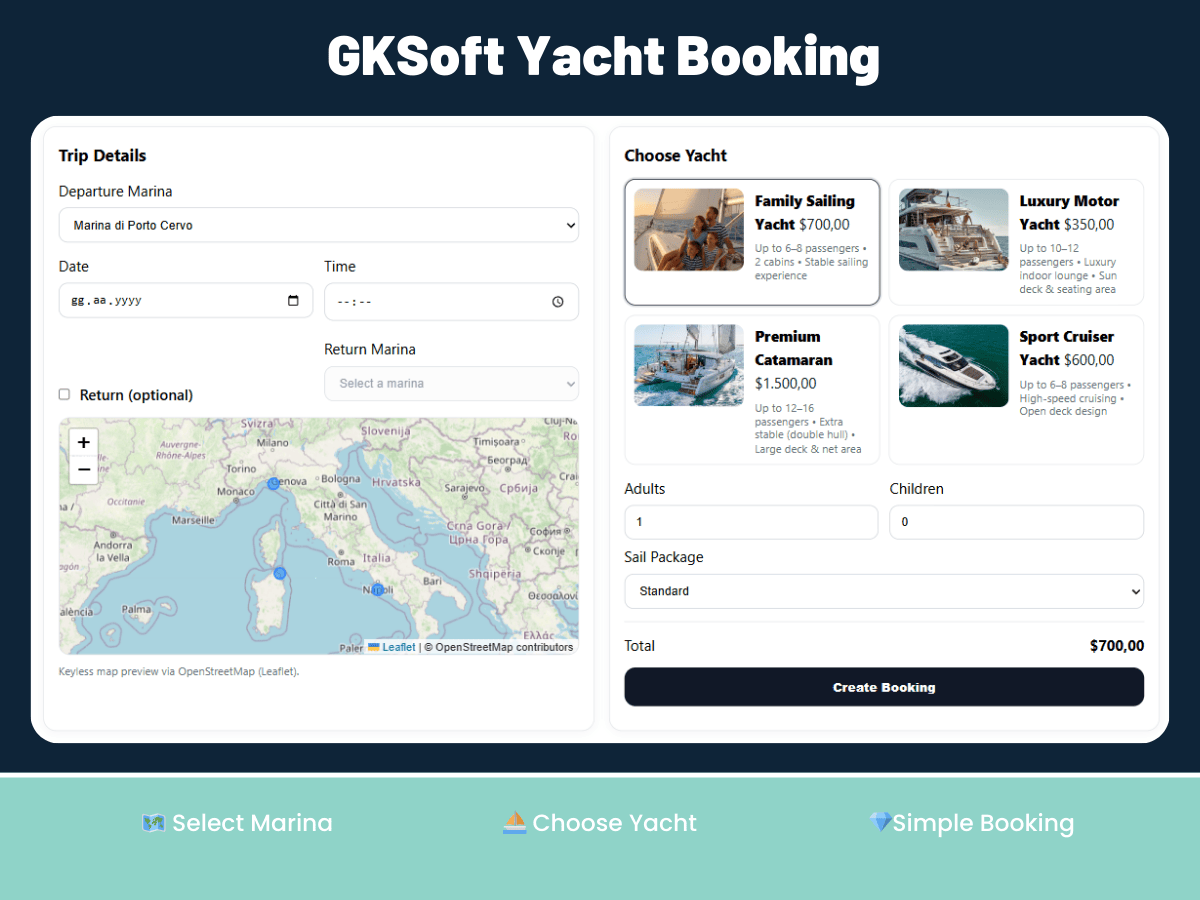
Real flow — marina → yacht → date/time → guests → checkout. This is what turns visitors into paid bookings.


Business-ready yacht booking flow — not a “toy plugin”.
Everything you need to convert website visitors into booked charters.
Marinas on Map
Show your marinas on the map and guide customers to the right departure point.
Yacht Management
Add yachts with images, base price, currency and features — keep your inventory organized.
WooCommerce Checkout
Bookings become WooCommerce orders — use Stripe/PayPal/bank transfer or any gateway.
Date & Time Selection
Customers choose departure date/time (and optional return) — fewer messages, faster decisions.
Adults & Children
Collect passenger details cleanly for safety planning and a professional booking record.
Admin Settings
Set currency, minimums, rules and form behavior — go live without custom development.
Go live in 3 steps.
Install the plugin
WordPress → Plugins → Add New → search “Yacht Charter Booking” and activate.
Add a marina and a yacht
Go to Yacht Booking → Marinas & Yachts and create at least one of each.
Place the booking form
Add the shortcode [gk_yacht_booking] to any page. Start accepting bookings.
Frequently Asked Questions
Why should I pay for Pro?
Pro is for charter businesses that want higher conversion and smoother operations:
• Marina management with map (lat/lng)
• Yacht management (images, base price, currency, features)
• Visual yacht selection (better UX → better conversion)
• Optional return trip and more control
• Priority support
In most cases, Pro pays for itself after just 1–2 bookings.
What are the minimum requirements?
WordPress 6.0+, PHP 8.0+, WooCommerce enabled, and a Google Maps API key (Maps JS + Places) if you use the map/autocomplete features.
Can I use it without WooCommerce?
Lite can be used for booking requests, but for payments and a proper order flow, WooCommerce is recommended.
Does it support hourly or daily pricing?
Yes — you can set base pricing per yacht and extend with rules (hour/day, seasonal pricing) in Pro/custom builds.
Quick Setup
# 1) WordPress → Plugins → Add New → Gksoft Yacht Booking
# 2) Go to Yacht Booking → Marinas & Yachts and create at least one of each.
# 3) Add the shortcode below on any page:
[gk_yacht_booking]